1. Accounts
ACal API(en-US)
  • Get Started
    • Quickstart
    • Integration Solutions
  • API Functions
    • Accounts
      • README
      • Login (Auth)
        POST
      • Logout
        POST
    • DUT
      • Others
        • Query DUT count by condition
        • Query DUT information by condition
        • Get DUT information by ID
        • Batch save DUT info that shares the same template but differs only by ID
      • Batch save or update DUT information
      • Delete DUT
    • Test Records
      • README
      • Query Key-Value Data
        • Key-Value Data Response Message Specification
        • Query Record Dictionary Data by Condition
        • Get Record Dictionary Data by ID
        • Query Unsynced Record Dictionary Data
      • Export Certificate Excel File
        • Export Certificate as Excel by Condition
        • Export Certificate as Excel by ID
        • Export Certificate as Excel by Template
      • Export Certificate PDF File
        • Export Certificate as PDF by Condition
        • Export Certificate as PDF by ID
        • Export Certificate as PDF by Template
      • Query Structured Data
        • Query Record Structured Data by Condition
        • Get Record Structured Data by ID
        • Query Unsynced Record Structured Data
      • Others
        • Data Sync Status
          • Query Unsynced Record Count
          • Update Record Sync Status
        • Query Record Header Structured Data by Condition
        • Query Same Calibration-Task Record Dictionary Data by Condition
        • Delete Record
      • Query Record Count by Condition
    • Others
      • References
        • Query DUTs that meet the condition
        • Get DUT by ID
        • Query count of DUTs that meet the condition
        • Query device types of standard instruments
        • Save or update DUT information
        • Delete DUT information
      • Templates
        • Get user template list for the specified DUT type
      • Reports
        • Query record report data by condition
        • Export record report CSV by condition
        • Query count of record report data by condition
  • Releases
    • Changelog
  1. Accounts

README

1. Authentication Mode Configuration#

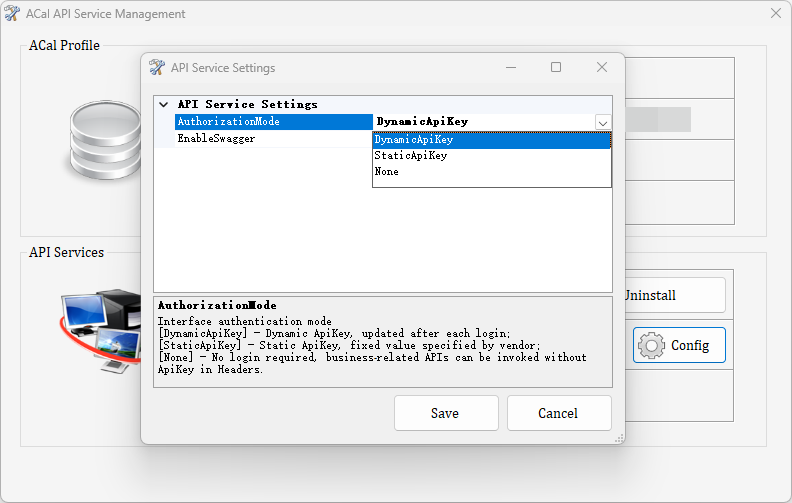
ACal can be configured with two identity authentication modes:
No-Authentication Mode: Call a specific API interface directly without verifying the identity of the caller.
Authentication Mode: Before accessing a business interface for the first time, you must log in using an ACal account and password to verify your identity.
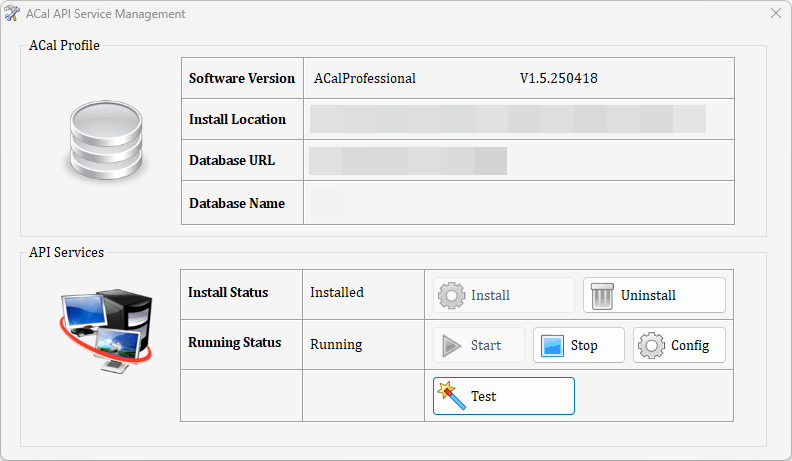
Operation method: Run APIServiceManager.exe in the ACal software installation directory and click the "Config" button.
The API service disables authentication mode by default. To enable it, follow the steps shown below:

2. Authentication Mode#

Before accessing a business interface for the first time, you must log in using the ACal software account and password to verify your identity. Upon successful authentication, an ApiKey is returned with a timeout of 20 minutes.
Request URLhttp://127.0.0.1:8600/ACal/AccountService/Login
Request Body
Account information

Response{
"StatusCode": 0,
"AccountID":"admin",
"AccountName":"Administrator",
"ApiKey": "7db82f63-ef7a-4c7c-81b5-1bf4698b3701"
}
Description1. If authentication succeeds, StatusCode is 0 and an ApiKey is returned.
2. If authentication fails, StatusCode is 101 (invalid account) or 102 (incorrect account or password).
When calling a business interface, you must add an ApiKey property to the request Header. This verifies both the logged-in identity and whether the user has access permission for the interface. Access permission depends on the operation permissions of the logged-in account.
Request URLhttp://127.0.0.1:8600/ACal/xxx/xxx
Request HeaderApiKey=7db82f63-ef7a-4c7c-81b5-1bf4698b3701
Request BodyIgnored
Response{
"StatusCode": 0,
……
}
DescriptionIf the ApiKey is invalid or expired, StatusCode = 2
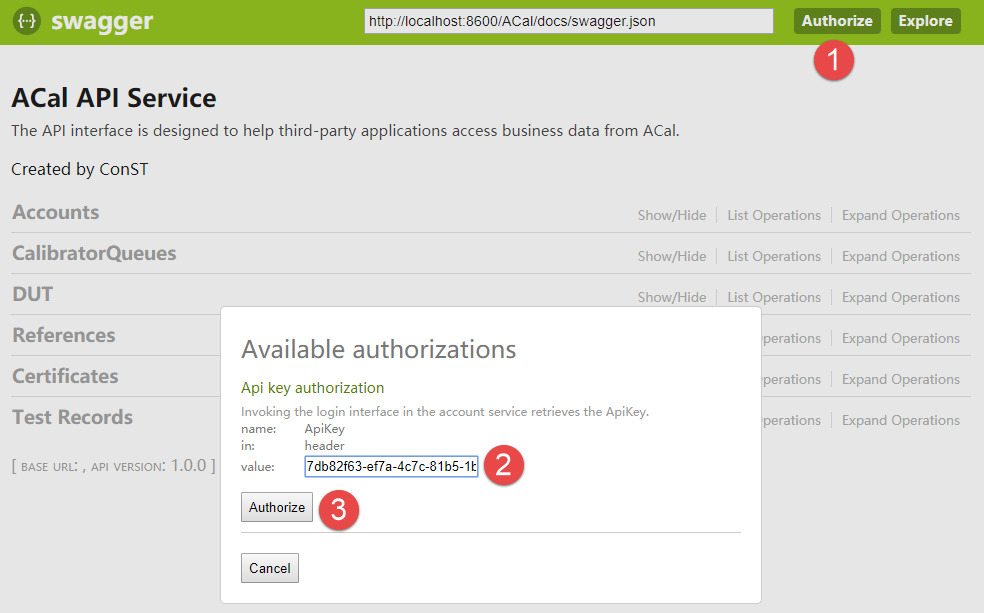
To authenticate in Swagger:
1.
Click the "Authorize" button.
2.
In the popup value text box, enter the ApiKey returned by calling the Login interface.
3.
Click the "Authorize" button in the popup.
After the interface operations are finished, call the Logout interface to end the session.
Request URLhttp://127.0.0.1:8600/ACal/AccountService/Logout
Request HeaderApiKey=7db82f63-ef7a-4c7c-81b5-1bf4698b3701
Request BodyNone
Response{
"StatusCode": 0,
}
Modified at 2026-09-04 12:15:23
Previous
Integration Solutions
Next
Login (Auth)
Built with